← Exceed One Co., Ltd.日本語EnglishTiếng Việt
WINDOWS FILE SERVER × ACCESS CONTROL

See the access rights on your file servers.
For audits, ransomware defense and cleaning up leavers' permissions.

FAD turns "who can do what in which folder" into an Excel list. Use it for permission reviews for ISMS, Privacy Mark and internal audits, for narrowing permissions that are too broad, and for removing permissions left behind by people who have left. Problems you find can be fixed right away in a screen that works like Explorer.

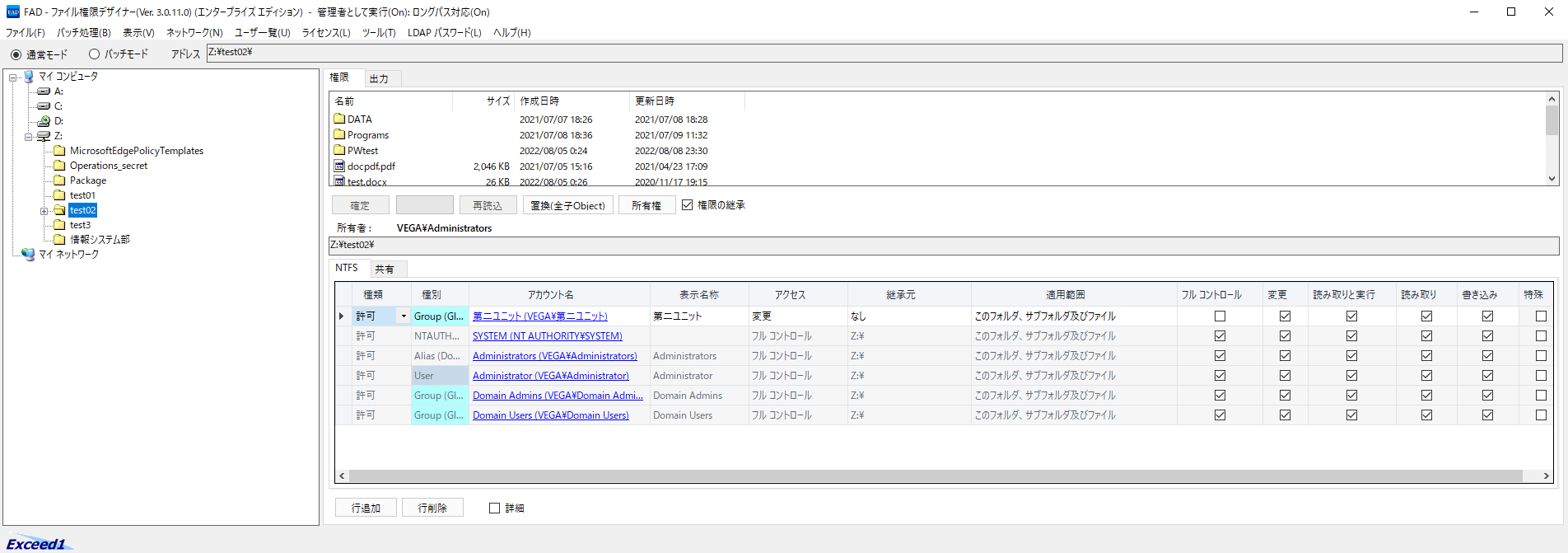
FAD: permissions on the actual screen (Z:\test02)
AccountAccessInherited from
第二ユニットModifynone
SYSTEMFull controlZ:\
AdministratorsFull controlZ:\
AdministratorFull controlZ:\
Domain AdminsFull controlZ:\
Domain UsersFull controlZ:\
Full control for Domain Users (everyone in the domain): find and fix overly broad access
About 40×faster permission output1,000,000 rowsoutput to ExcelThousandsof government agencies, universities
The FAD main window: the folder tree on the left, the file list at the top right, and the list of access rights at the bottom right
About 40×faster permission output
(entire shared folder: 1,574 s → 40 s)
1,000,000 rowscan be output to Excel
Server 2008–2025Windows Server supported
Thousandsof government agencies, universities
and companies (customers)
CUSTOMERS

Used by thousands of organizations, including government agencies, universities and major companies

Organizations that handle highly confidential information use FAD to check, change and audit the access rights of their file servers.

🏛️

Government and universities (Japan)

  • National Police Agency
  • Ministry of Education, Culture, Sports, Science and Technology (MEXT)
  • Japan Self-Defense Forces
  • Tokyo Metropolitan Government, Bureau of Construction
  • Hitotsubashi University
🏭

Companies (manufacturing and construction)

  • Major automaker
  • Major electronics manufacturer
  • Heavy industry manufacturer
  • Materials and chemicals manufacturer
  • Pharmaceutical company
  • Food manufacturer
  • Major construction company
🏢

Companies (telecom, services and finance)

  • Major telecommunications carrier
  • IT and internet company
  • Theme park operator
  • Staffing services company
  • Financial institutions (life insurance, non-life insurance, banks, government-affiliated financial institutions, credit cards)

Companies are listed by industry. Case studies (Japanese)

WHY FAD

Answers "who can do what, and where" on your file servers

Checking and changing permissions is needed for every audit, every security review and every change of staff. FAD makes it fast and accurate.

🔍

Audits (ISMS, Privacy Mark, internal audits)

Export the permissions of each folder to an Excel list and use it for your permission review. (Privacy Mark is a Japanese certification for personal information protection.) The audit report compares the previous and current output, so you can also answer "what has changed?" right away.

🛡️

Reviewing permissions against ransomware

Ransomware damage can spread to every folder the infected user can write to. Find the folders where Everyone or similar groups have Modify permission, and narrow them down to the people who need it.

👋

Cleaning up permissions of leavers and transfers

List the folders a user can access, including through the groups they belong to. Permissions left on deleted accounts or on accounts unused for a long time can be checked and then removed.

To change permissions, just tick the boxes in a screen with the same order and the same terms as Explorer, and click OK. Large numbers of changes can be applied as planned with batch mode and the command line.

NEW IN 3.0.11–3.0.14

Major improvements for audits and permission cleanup

Permission output is also much faster: 1,574 s → 40 s for an entire shared folder in a domain environment (our own measurement).

NEW

Audit report (changes in permissions)

Compares two permission outputs and lists the changes in permissions, owners, inheritance and folders as "added / removed / changed". Use it for regular audits and for checking before and after a change.

  • Outputs with different column orders can also be compared
  • Can be run regularly from the command line (FADCmd /diff)
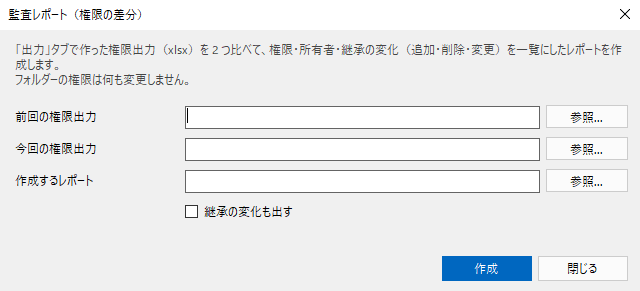
The audit report window
NEW

Clean up permissions left on leavers' and unused accounts

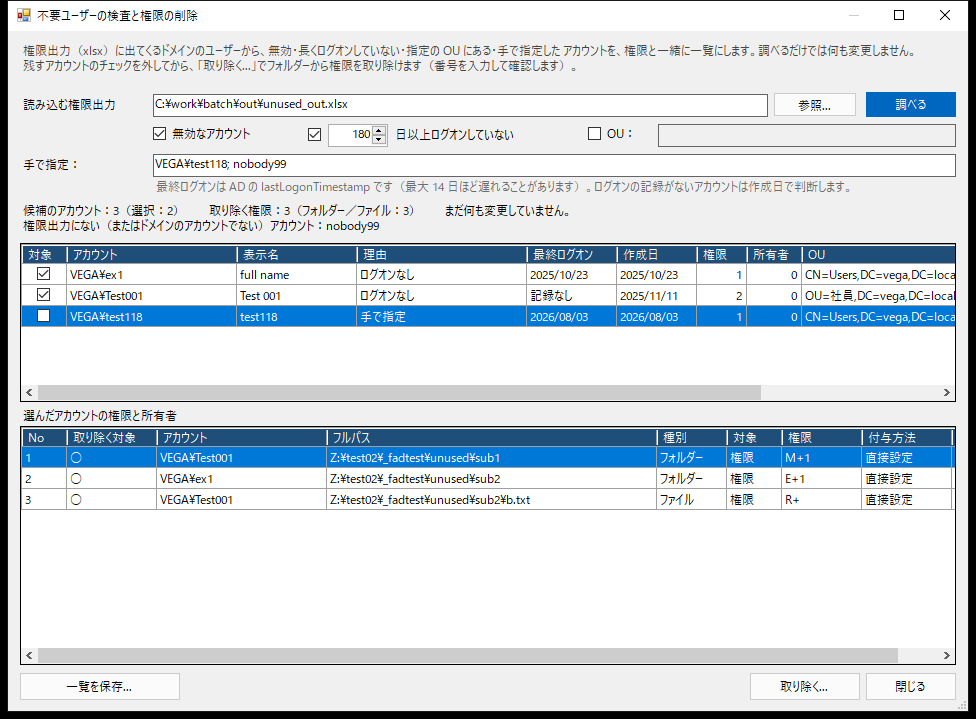
Permissions of accounts deleted from AD tend to stay on folders. FAD finds and lists them, and removes them after you have checked. It can also check permissions of disabled accounts and accounts that have not logged on for a long time (3.0.13).

  • Checking alone changes nothing
  • Removal only after you enter a 4-digit number
  • A removal report is saved automatically
The Unused accounts (check and remove) window
3.0.12

Output only the rows that matter with "Output inherited"

When "Output inherited" is off, folders and files that only have the same permissions as their parent folder (inherited only) are left out, and only the places where permissions are set individually are output.

  • Example: 2,705 rows → 19 rows
  • Levels up to "Always output levels" are still output as headings
  • Also new: go to a folder from the address bar, and show the servers of the domain
Options on the Output tab (Output inherited, Always output levels)

See all features Roadmap (FAD v4)

Start with the Free Edition

A trial key that unlocks all Professional features is also available.

DownloadRequest a trial key