FPC File Password CheckerFind unprotected files and secure them all at once — a data leak prevention tool
Exceed One Co., Ltd.
https://exceedone.co.jp/fpc/en/
Just open a folder and FPC finds files without a password (unprotected files) among Excel, Word, PowerPoint, PDF and ZIP files. You can then password-protect them right there in bulk.
Eliminates the "open each file and check" task during shared-folder inspections and security audits. Results are logged to prevent any important files from slipping through. In use since 2015, primarily at major financial institutions and large enterprises.
Benefits
~0.2 sec3,016 files checked (batch mode). Previous version: 192 sec. Reads file contents directly
No Office neededChecks without Office installed. Works on servers and PCs without Office
AES-256Sets passwords using the same method as Office. Also supports PDF
Problems solved
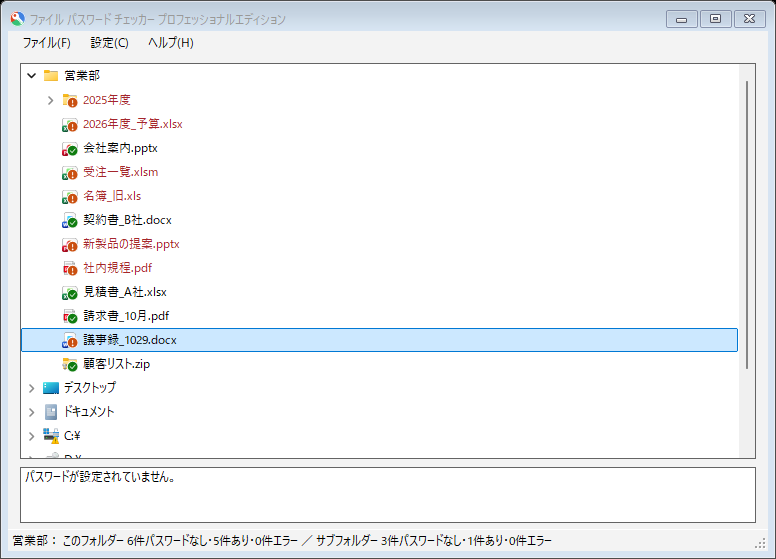
Don't know where unprotected files areOpen a folder and FPC automatically checks, marking unprotected files with icons and red text. Counts are tallied including subfolders.
Opening each file to check is too much workReads file contents directly without opening in Office. On our PC, 3,016 files were checked in about 0.2 seconds.
Need to enforce password protectionSet passwords with double-click or right-click. Optionally keep a copy of the original file. Bulk-set passwords on listed files (Professional).
Need to regularly inspect shared folders and keep recordsCheck folders via command-line (batch mode) and log the results. Schedule with Task Scheduler (Professional).
Screenshot
Features, pricing & requirementsFPC File Password Checker
Exceed One Co., Ltd.
Key features
Check for passwordsExcel, Word, PowerPoint (new and legacy formats), PDF and ZIP. Also detects PDFs with only edit/print restrictions.
Set passwordsNew-format Office files and PDF: AES-256 without Office. Legacy formats (xls/doc/ppt/pps): via Office.
Check subfolders & countScans subfolders in the background and shows separate counts for the current folder and subfolders.
Batch mode (bulk check & set)Run via FPCCmd. Checks multiple files in parallel for high speed (Professional).
LoggingOperation log and change log. File names can be masked. Passwords are not logged by default.
Shared folders & network drivesAdd network shared folders as check/set targets (Professional).
Editions & pricing (excl. tax)
| Edition | Price | Maintenance (opt.) | Includes |
|---|
| Free | ¥0 | N/A | Word check & set (up to 10 files) |
| User | ¥3,000 | ¥300/yr | GUI check & set (all formats) |
| Professional | ¥98,000 | ¥9,800/yr | All features (shared folders, batch mode) |
1 license per device (VM and RDP sessions count as 1 device each). Maintenance is 10%/yr: support and priority patches.
System requirements
| OS | Windows 10 (21H2+) / 11, Windows Server 2022+ |
|---|
| .NET Framework | 4.8.1 |
|---|
| Microsoft Office | Not required for checking (only for setting passwords on legacy formats; 365, 2016–2021 Japanese edition) |
|---|
| Deployment | Extract ZIP — no installer or admin rights needed. Code-signed. |
|---|
Contact
Exceed One Co., Ltd. https://exceedone.co.jp/en/contact-us/
Product site (features, FAQ, manual, download): https://exceedone.co.jp/fpc/en/
Full-feature trial keys (time-limited, once per company) available from the contact form.