← Exceed One Co., Ltd.日本語EnglishTiếng Việt
FILE PASSWORD AUDIT × DATA LEAK PREVENTION

Important files left unprotected?
Find them without opening, and protect them in bulk.

FPC (File Password Checker) is a data leak prevention tool. It finds Excel, Word, PowerPoint, PDF and ZIP files without passwords on your file servers and PCs. You can protect the files it finds with passwords right away, in bulk. The results are logged, so you can also use them as an audit record. FPC reads the file contents directly, so Office is not required. The app's interface is in Japanese (an English interface is planned).

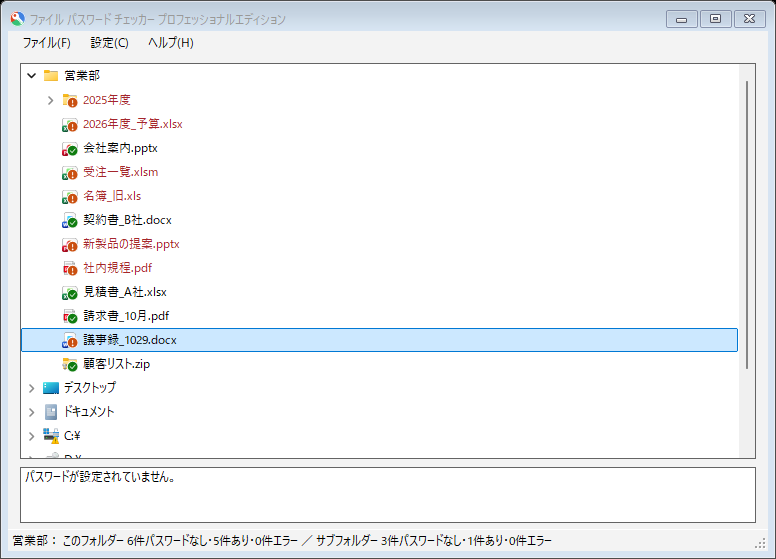
FPC: check results on the actual screen (Japanese UI)
  • 2026年度_予算.xlsx
  • 会社案内.pptx
  • 受注一覧.xlsm
  • 名簿_旧.xls
  • 契約書_B社.docx
  • 新製品の提案.pptx
  • 社内規程.pdf
  • 見積書_A社.xlsx
  • 請求書_10月.pdf
  • 議事録_1029.docx
  • 顧客リスト.zip
This folder: 6 without a password, 5 with, 0 errors
0.2 sto check 3,016 files (batch)17 extensionssupportedNo Office neededworks on PCs and servers without Office
The FPC window. A folder tree shows icons indicating whether each file has a password
17 extensionssupported
(Excel, Word, PowerPoint, PDF, ZIP)
Checked in 0.2 s3,016 files (batch mode).
The previous version took 192 s (our measurement)
No Office neededEven on PCs and servers without Office,
just open a folder to see the results
CUSTOMERS

Used mainly by major financial institutions and large enterprises

Financial institutions and large enterprises that want to make sure no important file is left unprotected use FPC to audit their file servers and to set passwords on unprotected files in bulk.

WHY PASSWORDS

Encrypted storage doesn't stop files from walking out.
That's why the file itself needs a password.

Disk and cloud encryption is unlocked automatically for anyone who signs in correctly. With stolen IDs and passwords in the news again and again, the last line of defense for your information is the file itself. Setting passwords is not a "nice to have" but an essential safeguard.

🔓

Encryption only protects where files are stored

BitLocker and cloud encryption protect data at rest. They unlock automatically for signed-in users and authorized programs, and a copied file that leaves the organization opens as it is.

🎣

Assume IDs and passwords will be stolen

Phishing and leaks from other services keep exposing IDs and passwords. Once someone signs in with a stolen account, encryption and permissions no longer stand in the way.

✉️

Misdirected email, lost media, leavers

A wrong email address, a lost USB stick, files taken by someone who left. Once a file is outside, the only protection left is the password on the file.

🛡️

The last line of defense is the file

With a password, a file cannot be opened even if it is taken outside. FPC finds unprotected important files without opening them and protects them with passwords in bulk.

WHY FPC

Do you know where your unprotected important files are, and how many?

Shared folders keep collecting important files such as customer lists and quotes. Even with a policy in place, opening each file to check that it is protected is a lot of work. FPC finds, protects and records, all in one tool.

🔍

Find

Just open a folder. FPC checks the Office, PDF and ZIP files in it and marks the files without passwords. It also shows counts that include subfolders.

🔐

Protect in bulk

Set passwords on the files it finds, one at a time on the spot or in bulk. You can also set a different password for each file. FPC makes a backup before setting a password.

🗄️

Record and audit regularly

Check and set results are logged, giving you an audit record. Shared folders and network drives can also be checked regularly from the command line (Professional).

HOW IT WORKS

Check and protect on screen, audit regularly from the command line

On screen (GUI mode)

Open a folder in an Explorer-like tree and FPC lists its files immediately, checks them in the background, and marks each file icon to show whether it has a password. Double-click or right-click a file without a password to set one on the spot.

  • Files without passwords stand out with an orange "!" and red text
  • The status bar shows how many files in each folder have and don't have passwords
  • You can back up the original file before setting a password
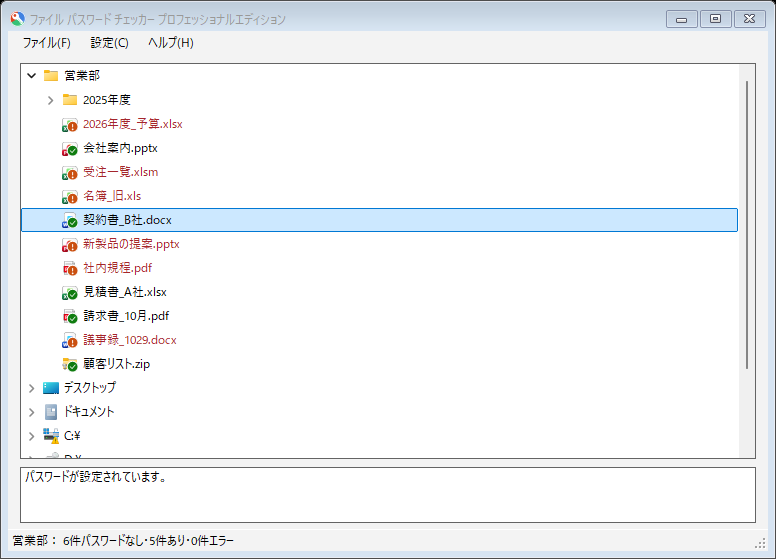
The window after setting a password

Command line (batch mode)

Give FPCCmd.exe a folder to check in bulk, or a list of files to protect in bulk. Register it in Task Scheduler to audit your file servers regularly and keep a record of the results.

  • Results are logged one line per file (PR: has a password, UP: no password, SC: password set)
  • Options control the log delimiters and what is output
LOG.TXT
Date/timeResultFile
2026/10/31 12:00:51PRC:\Document\Quote.docx
2026/10/31 12:00:53UPC:\Document\Customers.xlsx
2026/10/31 12:00:56PRC:\Document\Proposal.pptx
2026/10/31 12:00:58UPC:\Document\Materials.zip
2026/10/31 12:01:02--C:\Document\Photo.png

Example command: FPCCmd.exe /l:C:\FPCLOG\LOG.TXT /c:C:\Document

NEW IN VER 1.5

New in ver 1.5: no Office needed, much faster, and PDF protection

FPC now reads the file contents directly to decide. You can audit even servers without Office in a short time.

🚫

Check and protect without Office

FPC reads the file contents directly, so you can check files on PCs and servers where Office is not installed. Newer formats such as xlsx, docx and pptx can be protected with AES-256 passwords without Office.

📄

Find and protect PDFs too

Find PDFs that have no open password and protect them with AES-256. PDFs that only have editing or printing restrictions are identified and shown as such.

⚡

192 s → 0.2 s

Multiple files are checked in parallel. Checking 3,016 files (batch mode) went from 192 seconds in the previous version to 0.2 seconds (measured on our PC).

🎨

Results at a glance

Icons show files with passwords (green ✓) and without (orange !), together with counts. The window stays responsive while checking and shows progress and a "Cancel" button.

📂

Check subfolders too

When turned on, FPC also checks the lower levels in the background when you open a folder, and shows separate counts for the folder and its subfolders.

📝

Improved logging

By default, passwords you set are not recorded in the log. New options let you mask file names and keep a record of passwords being set.

See what's new See the roadmap

Start by checking for unprotected files

Try the Free edition right away. We also offer a trial key (once per company) to try all features on your file servers.

DownloadRequest a trial key